



In this release
Metabase 61
AI governance — access controls, token limits, Metabot customization, usage analytics, and dashboards-as-code.
 The Metabase Team
· May 20, 2026
· 8 min read
The Metabase Team
· May 20, 2026
· 8 min read
In v60 we put AI features in all plans, including Open Source. With v61, we give you the controls for AI governance that make it yours to deploy safely.
Some call it the Fun Police. We prefer: AI that’s realistic for orgs of all types to roll out, including those who need tighter oversight over who gets to use it (bit of a mouthful though).
- If you’re hosted on Metabase Cloud, we’ll be rolling out these new features automatically soon. If you just can’t wait to try all this, email help@metabase.com and we’ll upgrade you.
- If you’re self-hosting Metabase, you (or your admin) can follow the docs on how to upgrade.
Access controls for who can do what with AI
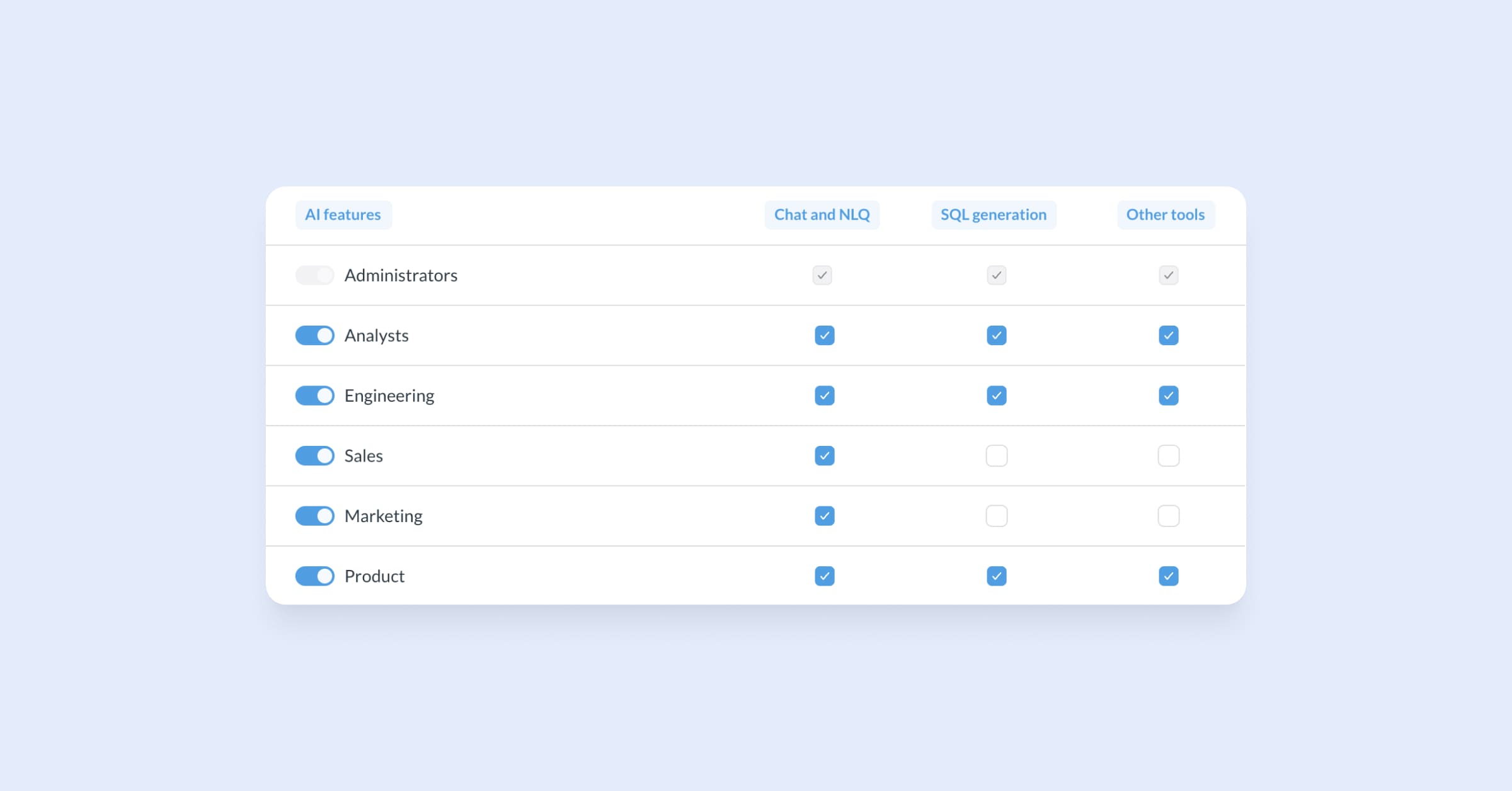
Granular AI controls to manage access per feature and per user group, for internal and embedded analytics. Let your finance team ask questions in their own language in Metabot. Give your product team access to AI for SQL generation or auto-generated transforms. Give your data team access to all AI tools. Set nothing for the teams who shouldn’t have it.
Find AI usage controls in your Admin settings → AI to give access per feature and user group. Try for free with Pro.
Set token limits so AI doesn’t drain your bank account
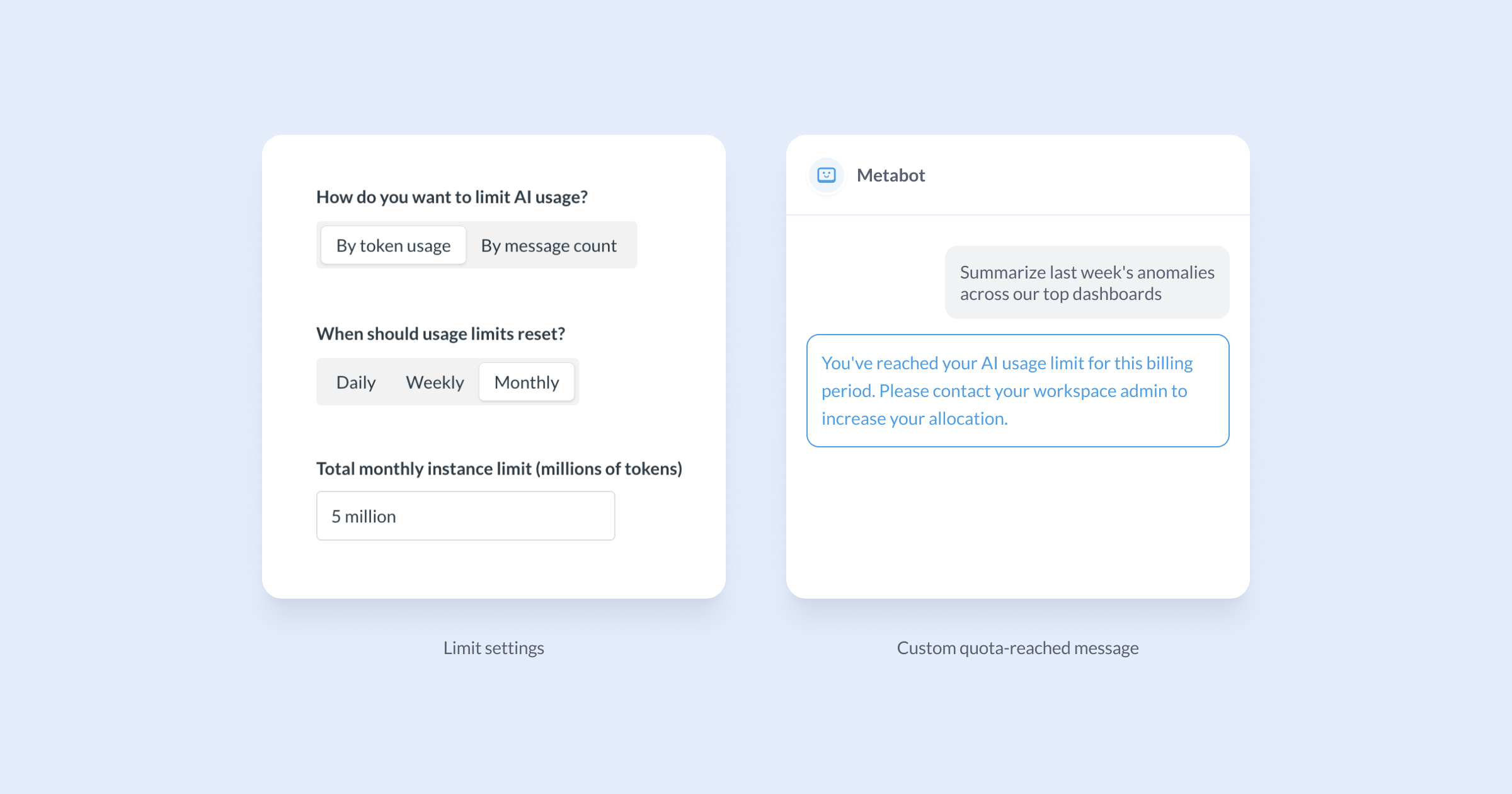
Turning AI loose in your org without token restrictions is not for the faint of heart. We added controls to set a token limit at the instance level, and allocate a set amount of tokens or messages per user group, or per customer for embedded analytics. Choose when your limits reset — daily, weekly, or monthly.
Set token limits in your Admin settings → AI. Try for free with Pro.
Make Metabot your own, with system prompts and customization
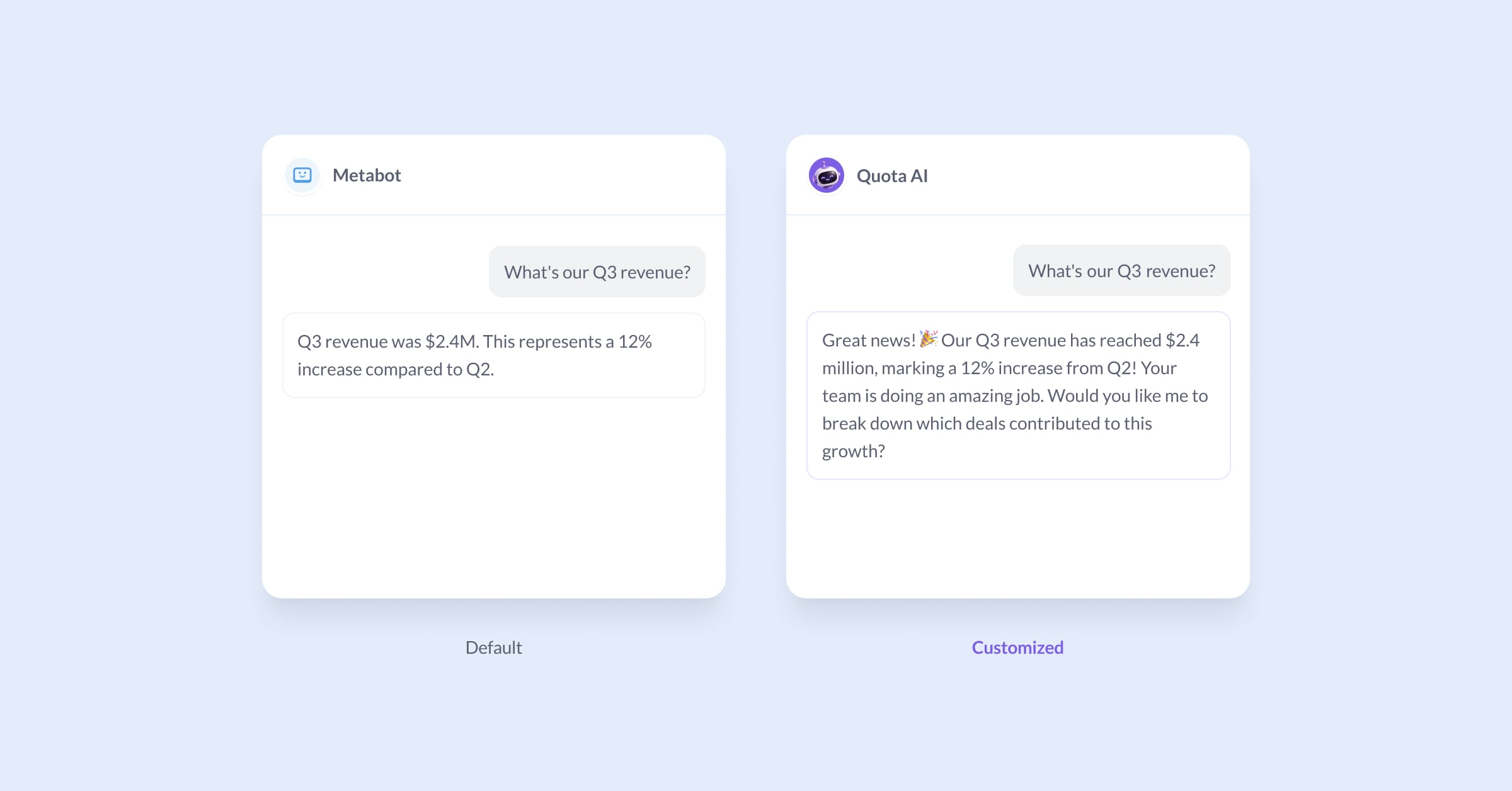
White-label Metabot for your org by customizing its name, icon, and adding system prompts to instruct it on how to perform for AI chat, natural language querying, and SQL generation — so it sounds like it’s on your team.
System prompts are like context files that give AI the specifics of your business and your Metabase. Give it guidance on the tone you want it to use in chat, tables to treat as canonical, which colleague to blame if something goes wrong. Literally, anything.
Customize Metabot and set up your system prompts in Admin settings → AI. Try for free with Pro.
AI usage analytics: see questions asked, token usage, and more
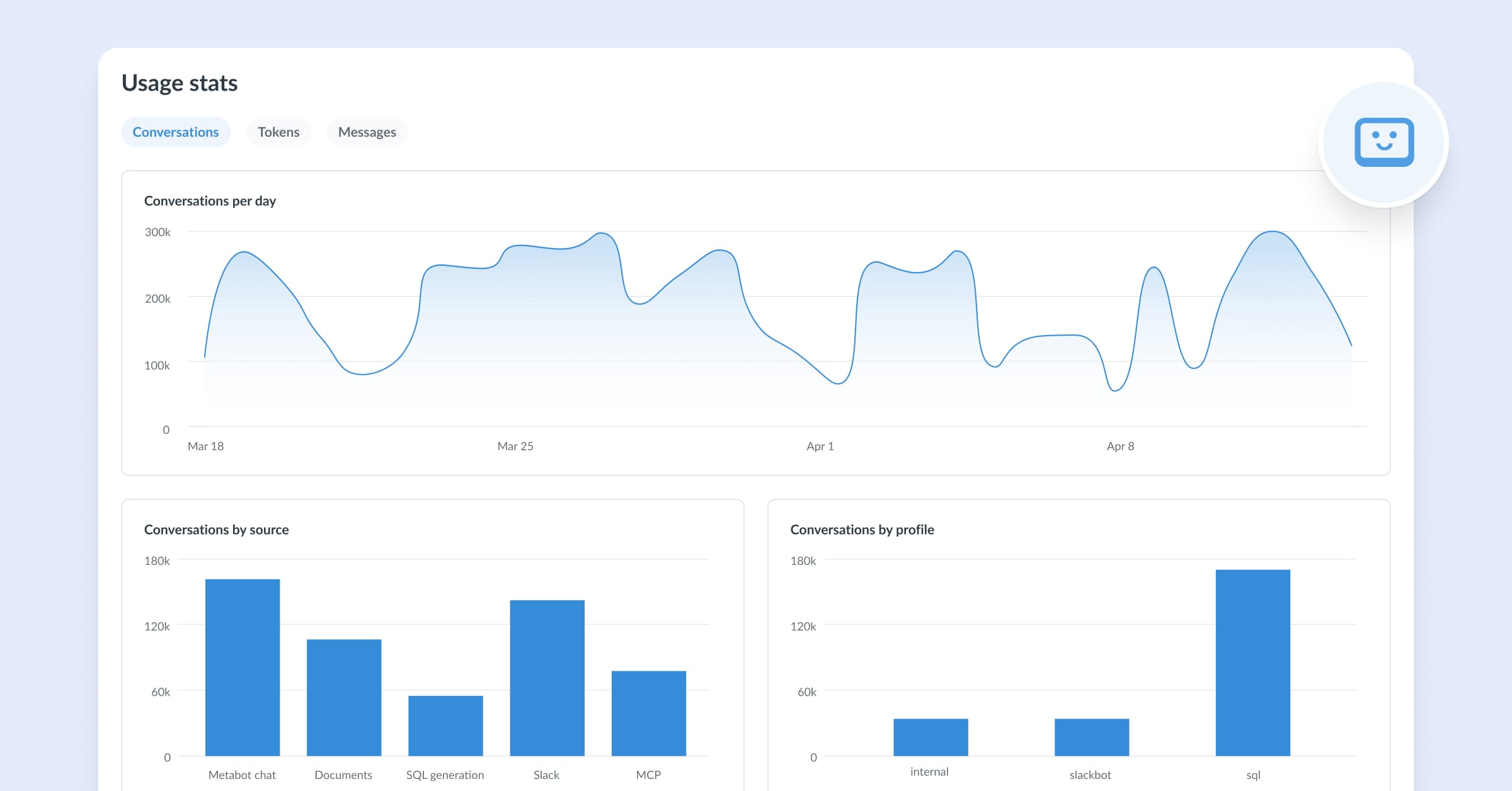
AI usage analytics is a pre-made dashboard in your Admin settings → AI. You can see aggregate views of token spend, which features are being used most, and who’s most active over time.
Track AI usage across your Metabase in Admin settings → AI → Usage auditing. Try for free with Pro.
Dashboards-as-code built in your AI terminal
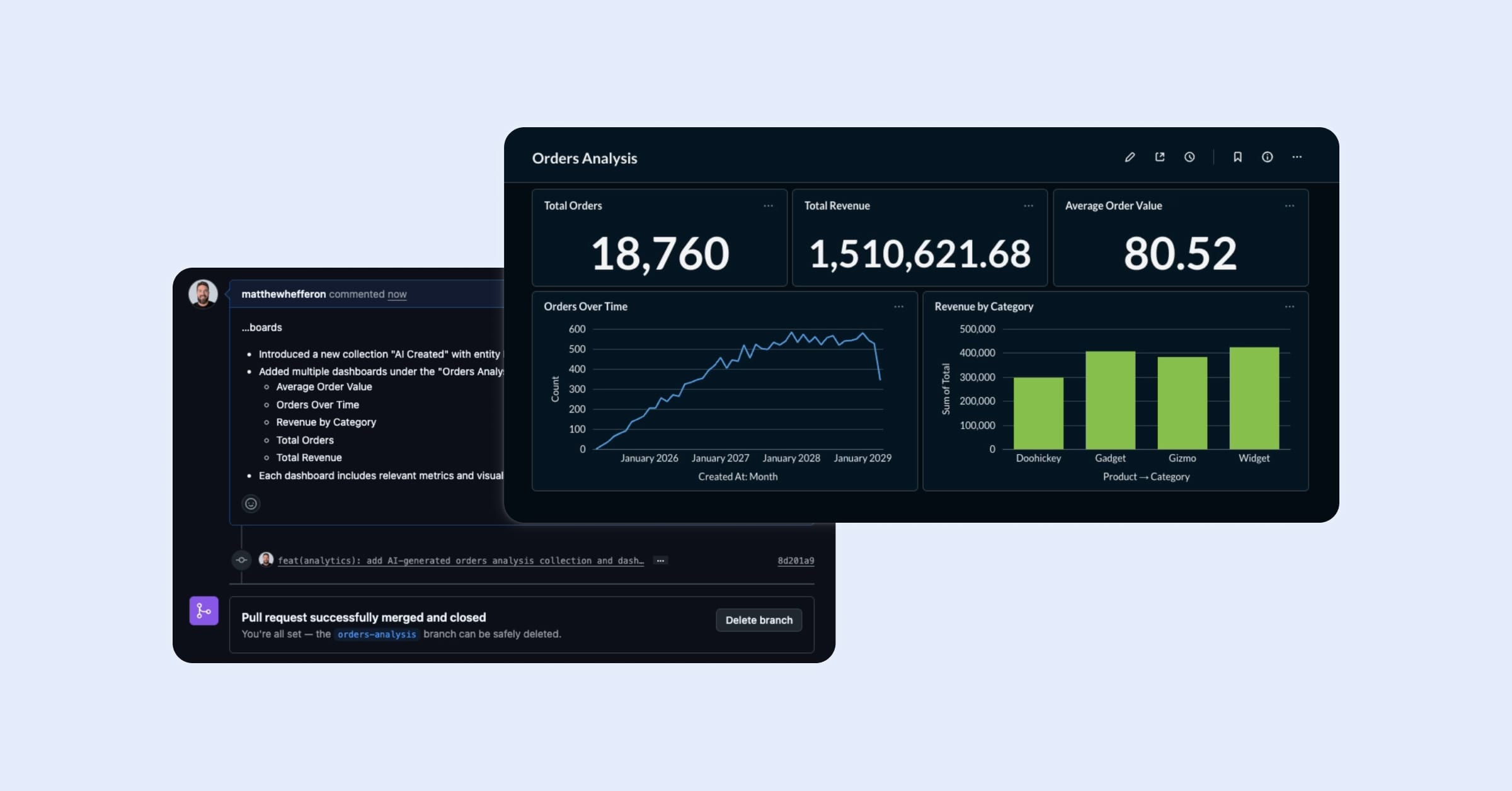
Open Claude Code or Cursor. Type: “Create a dashboard for our support tickets.” Your AI tool pulls context from your Metabase metadata, writes the queries, and commits a dashboard YAML file to git, ready for you to review before anything touches production.
Bulk edit and migrate dashboards to a new schema without clicking through the UI. Everything goes through git, with automated validation, before it goes live. Requires Remote Sync.
The MCP server now supports question and dashboard creation
Connect Metabase to your AI terminal and build questions and dashboards through conversation. With the MCP server connected in Claude, try:
It’s more interesting with real data, but you get the idea - now you have a dashbaord, and all you had to do was ask.
Metabot can write custom expressions in the query builder
What it says on the tin. Open the sample database, pull up Metabot, and try:
Metabot will write the CASE expression and build the column without you touching the expression editor.
Not just AI — the metrics layer got smarter too
More power in the Metrics Explorer
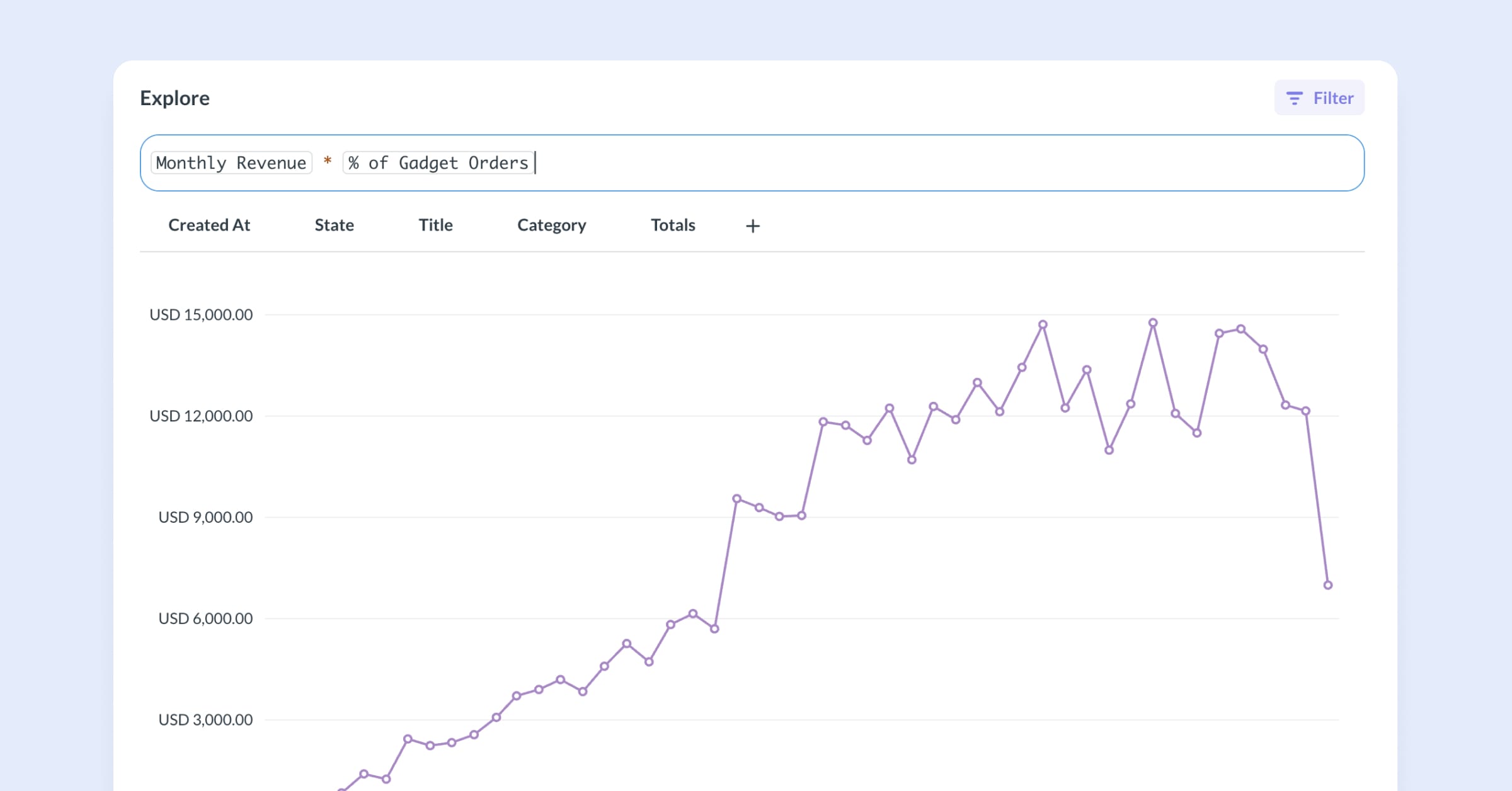
The Metrics Explorer launched in v60 for side-by-side metric comparison. v61 adds metric math and more control over each metric:
- Write arithmetic expressions across metrics in the top bar (
Revenue / Number of orders,Orders this month - Orders last month). Results appear as a new series in the view. - Same metric, different slices. Add a metric more than once, each instance with its own filters or dimensions to compare slices side-by-side.
- Totals tab to see the result as a single number rather than a chart.
Handy when you want to combine or compare metrics that live in different tables without having to set up a join. Open a metric and click into Explore to try it.
Security Center for self-hosted Metabases
Targeted, timely security alerts specific to your version and configuration, with guidance on what to do about it. See them in Security Center, or get notified via email or Slack.
This new Admin page polls your instance every few hours against the Metabase security advisory database, or you can check manually any time. Replaces generic blast emails that can be easy to miss or that aren’t relevant to your instance.
Find the Security in your Admin settings (from v56 and up on Pro and Enterprise plans).
Embedded Analytics
AI chat embeds with either inline or dedicated charts
The useMetabot React hook gives you direct access to Metabot’s raw state — messages, loading indicator, send function — so you can build any UI on top of it.
Previously, <MetabotQuestion /> offered AI querying with 3 preset layouts. useMetabot is the lower-level primitive underneath. Same Metabot with more control over how it looks and fits into your app.
useMetabot works with Modular Embedding SDK. Try for free with Pro.
More visibility into how your customers use your embedded charts
More usage analytics for embedded analytics to support admins’ understanding of who your most active customers — or tenants — are, which content gets the most views, and how people are accessing your embedded content via auth method for security audits.
Find the preconfigured embedding usage analytics dashboard in the Usage analytics collection, accessible to admins. Filter on date range, time grouping, and drill through charts for more detail.
Find the dashboard in Usage analytics → Embedding Usage in your left-side nav (admins only). Try for free with Pro.
Automatic token renewal for Guest Embedding
Your embedded users don’t know what JWT is. They just know the dashboard went blank, and they think they’ve hit an error.
Guest embed sessions no longer break mid-dashboard when tokens expire. Automatic renewal means sessions stay alive through multi-tab dashboard explorations, and filters and drill-throughs stay applied for longer sessions.
Easier to configure, preview, and reuse themes for embedded analytics
The new Themes editor gives non-devs a wizard-based tool to try out, preview, and configure new themes to be applied consistently — separating theme configuration from implementation.
Try out themes in Admin settings → Embedding → Themes. Try for free with Pro.
Responsive layout improvements for embedded SDK components
Better experience for mobile users interacting with your embedded analytics. SDK components are now built for a 6-inch screen, not just desktop. No overflowing filters or truncated text — acts the way mobile users expect.
Pay as you go for Transforms, no longer a fixed price add-on
Previously available as a fixed-price add-on. Now pay only for what you use. First 1,000 transforms are free.
See the pricing page for more details, or head to Data Studio and give it a try.
Big thanks to everyone who contributed!
Thanks to everyone who submitted bug reports, feature suggestions, and pull requests. Metabase gets better and better thanks to your efforts.
Hope you enjoy the release. If you want to get into the nitty-gritty, check out our changelog.
Cheers,
The Metabase team
Share this release
See previous releases
All releasesGet started with Metabase
- Free, no-commitment trial
- Easy for everyone—no SQL required
- Up and running in 5 minutes